A new chapter is unfolding
We’re unifying our member experience through an administration and insurance change. Keep up to date with the transition and how you may be affected at each stage.

- Click here to get started
- Enter a valid email and phone number for this account. These can be different from the contact details on your previous account with your MemberAccess portal.
- Create a new password
Please make sure to complete the full verification process to access your member portal.
Heads up:
- You’ll be asked to verify your email and mobile number via a code
- The SMS authentication code is valid for 15 minutes
- To keep things smooth, please avoid requesting multiple codes
If you don’t receive your verification code:
- Clear your browser cache or try using incognito mode
- Switch to a different browser or device
- Double-check that your email and mobile details are correct
- Check your junk or spam folder for the email
Still having trouble? Contact our friendly team on 1800 021 227 for assistance.
Important updates
Please review these key changes.
Your account number
Your member number is now called your account number, but the number itself hasn’t changed.
Your new member portal
We’ll email or post instructions to activate your updated portal soon.
Your employer will need our new USI
To ensure contributions go to the right place, please let your employer know they must update their records with this Unique Superannuation Identifier (USI) from 10 December 2025: AET0100AU.
New BPAY details for contributions
If you make extra (after-tax) contributions — or your spouse does — you’ll need new BPAY details. Find them in the ‘Make a contribution’ section of your new member portal.
Update any recurring payments to avoid delays. Payments sent to your old BPAY reference may fail or be returned to your bank account, depending on your bank.
New postal address
Send any printed forms to:
Australian Ethical Super
GPO Box 3117
Brisbane, QLD 4001
Need help? Call 1800 021 227 (Mon–Fri, 8:30am–5:30pm AEST/AEDT).
What's changing?
Changes to administrator
Between 25 November (19 November for pension members) and Monday 15 December 2025, we competed the transition of our administration to GROW Super Ops Pty Ltd (GROW Inc, “GROW”.)"
This means a consistent experience for members, with the aim of providing quality customer service and improving the online member portal to manage your super account with ease.
During this time, there were some service restrictions.
Skip to:
Changes to insurance
Between 25 November and 15 December 2025, together with our insurance partner, MetLife, we made changes to your insurance to deliver a more consistent offering across the fund.
Skip to:
If you were not previously a Christian Super member, you’re not impacted by this transition.
Timeline

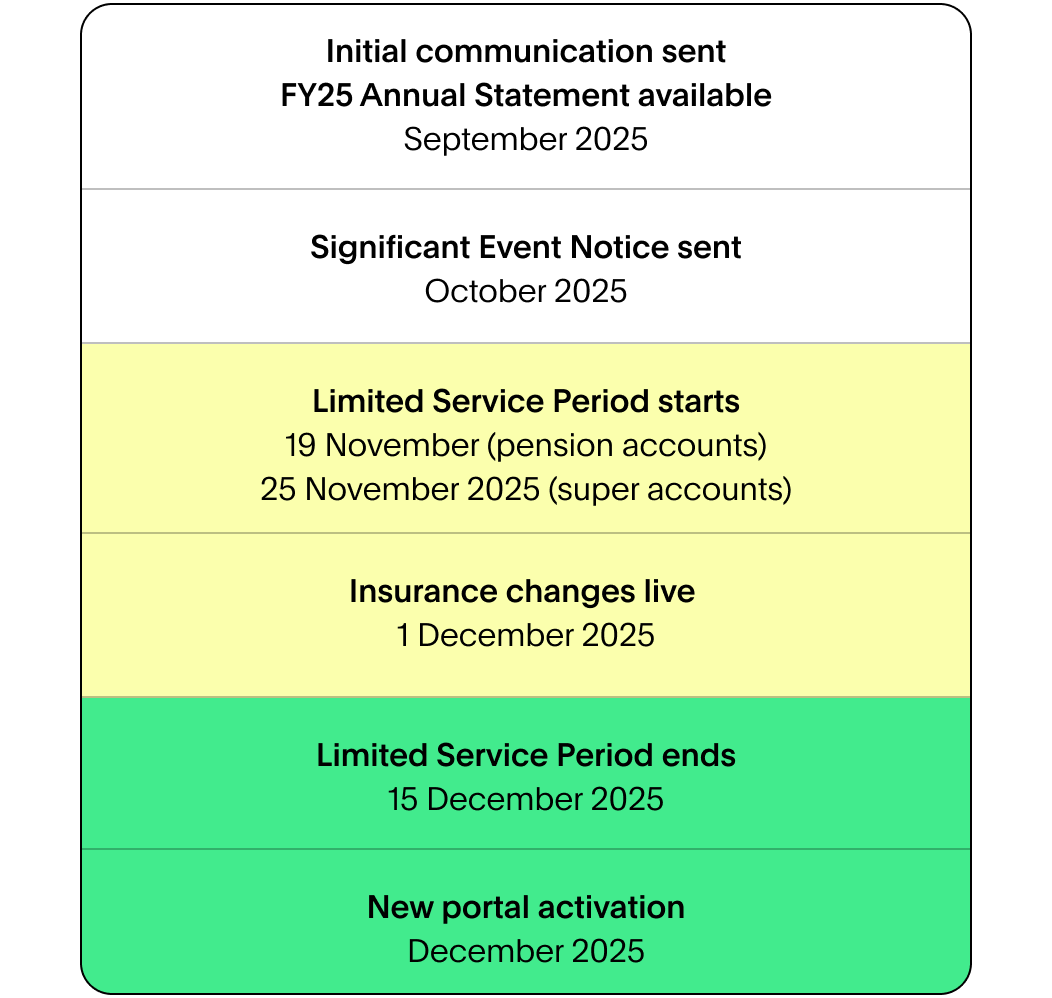
Servicing restrictions during the LSP
| MemberAccess Portal | 25 November – 15 December 2025 Will be ‘view only’ with account details not updated beyond 30 November 2025 |
|---|---|
| Account detail changes | 25 November – 15 December 2025 Personal details and beneficiaries can’t be changed |
| Display of balance, insurance, and investment | 25 November – 15 December 2025 These services will be temporarily unavailable. Any information visible in your account will be as at 30 Nov 2025 during this time. If you need to check your balance, insurance, or investments during this time, please call us on 1800 021 227 and we’ll be happy to assist you. |
| Super contributions and consolidations | 25 November – 15 December 2025 Will not be processed or viewable until after the LSP |
| Super lump sum withdrawals | 25 November – 15 December 2025 |
| Investment option switches | 25 November – 15 December 2025 |
| Insurance cover changes | 25 November – 15 December 2025 Can't cancel, reduce or fix cover or change occupation category |
| Insurance cover increases | 7 November – 15 December 2025 |
| Insurance claims | 25 November – 15 December 2025 Claims received before the LSP will continue to be assessed. Payment of claims will be delayed. |
| New pension applications | 14 November – 15 December 2025 |
| Changes to pension payments | 19 November – 15 December 2025 Can't change amount or frequency |
| Pension benefit payment requests | 19 November – 15 December 2025 |
Services that will be available
Importantly, we will continue to process benefit payments on the basis of Financial Hardship or Compassionate Grounds (subject to applications satisfying the regulatory requirements and certain limits).
Any insurance claims received before the LSP will continue to be assessed including new claims or those already under insurer assessment. Please note that payment of claims will be delayed until after the LSP.
You will still be able to call us for assistance on 1800 021 227, 8.30am to 5.30pm AEST/ AEDT Mon-Fri.

More information
In addition to the personalised Significant Event Notice sent to you, more information can be found in the following documents.
Documents:
- Full Insurance SEN with more detailed and supporting information
- Insurance Terms and Conditions
- Insurance Cover and Fee tables
- Insurance Guide
- Supplementary Insurance Guide – ex-Christian Super Income Protection
- Product Disclosure Statement
- Insurance needs & cost calculator
Forms:

Accessing your personalised SEN
How to access the personalised SEN from the member portal
- Log in to your member portal with your member number and your password
- Go to the 'More' section at the upper right corner of your dashboard and select 'Documents'

The core elements of Australian Ethical super won't change.
Elements such as investing, ethics, and our contact centre remain in the capable hands of the Australian Ethical team.
You can activate your member portal by clicking here.
You will need your Account number and access to your email and mobile phone to complete the activation process. You can find your Account number in a recent email from us. If your account starts with 1, use the 10-digit Account number. If you have multiple accounts, you can use either.
Yes, you can use any email address in order to activate your member portal.
However, the email address you use during activation will then be the email address recorded on your account going forward. During the activation process you will be asked to verify your email address via an authentication code (valid for 24 hours).
Yes, you can use any mobile in order to activate your member portal. However, the mobile phone number you use during activation will then be the mobile phone number recorded on your account going forward. During the activation process you will be asked to verify your mobile via an authentication code (valid for 15 min).
The email verification code is valid for 24 hours and the SMS verification code is valid for 15 minutes. Please avoid requesting multiple codes and wait a few minutes before requesting a new code, as this can cause confusion about which one is currently valid.
You can reset your password using the 'Forgot Password' link on the login page.
You will need to set a new password as part of the activation process. You can choose any secure password, as long as it meets the set requirements.
You can change your email address in your member portal.
- Login then go to your initials in the top right.
- Click on 'Contact details'
- Click on 'Email'
- Enter your email address then click 'Next’
- You’ll receive a verification code via your mobile to confirm the change.
You can change your mobile number in your member portal.
- Login then go to your initials in the top right.
- Click on 'Contact details'
- Click on 'Mobile'
- Enter your mobile number then click 'Next’
- You’ll receive a verification code via your mobile to confirm the change.
If you didn't finish activating your member portal, go to 'login' , enter your email address and password and follow the prompts. You should pick up where you left off.
If you've forgotten the password you created then click the 'Forgot Password' link on the login page.
You only need one member portal account. All of your Australian Ethical Super and Pension accounts will now be linked. When you activate your member portal, you can use either Account number to complete the activation process.
Your current membership number hasn't changed, however we now refer to it as your Account number. You can find your Account number in your Annual Statement, or in a recent email from us. If your account starts with 1, use the 10-digit Account number. If you have multiple accounts, you can use either.
When requesting the code, please type in your email address and mobile number. Do not use the pre-filled information from your password manager or browser autofill.
Email code:
- Check your email junk folder
- Wait for 5 minutes
SMS code:
- Include the '0' in your mobile number. It should be +6104XXXXXXXX, not +614XXXXXXXX.
- If you have an iPhone, please check your spam filter by opening the Messages app, clicking ‘Filters,’ and then selecting ‘Unknown Senders’. You will only see these ‘Filters’ if you have this option turned on.
If none of the above work:
- Clear your cache
- Try incognito mode
- Try with another device or internet connection
Your memberhsip number has not changed however we now referred to it as 'Account number'. You can find your Account number in a recent email from us. If your account starts with 1, use the 10-digit Account number. If you have multiple accounts, you can use either.
If you have not logged in to the member portal, you will need your Account number to activate it.
If you have super and pension accounts, using either Account number will work in the activation process.
You can change your name or date of birth by submitting the Change of Name or Date of Birth form in your member portal.
- Login then go to your initials in the top right
- Click on ‘Personal details’
- Click on 'Download form’
The completed form can be uploaded into your member portal, sent to the address of the form via post, or sent by email.
Your employer will need our new USI.
To ensure contributions go to the right place, please let your employer know they must update their records with this Unique Superannuation Identifier (USI) from 10 December 2025: AET0100AU.
The USI (Unique Superannuation Identifier) is a code used to identify a superannuation product. It’s used for processing contributions, rollovers, and other transactions.
As part of the transition of former Christian Super members to our new administrator GROW, the former Christian Super USI (CHR0001AU) will be decommissioned on 9th Dec 2025. From the 10th Dec onward, only the Australian Ethical Super USI (AET0100AU) can be used.
Any contributions submitted using the old USI number will be rejected because the USI will be closed.
Any contributions submitted using the old USI number will be rejected because the USI is now closed. Your employer needs your new Australian Ethical Super USI before they can resubmit contributions. Until you provide the updated details, your contributions will be rejected and your employer will receive an error message. Your super balance will also be affected. It's therefore important to notify your employer of the new USI as soon as possible to avoid disruptions or delays.
Contributions will not automatically redirect to a new USI. Employers require employee consent before updating their super and USI details. If your employer tries to submit contributions using the old USI, they will receive an error and will contact you for your updated super details.
You should immediately inform your employer about the new Australian Ethical Super USI AET0100AU as soon as you receive correspondence from us with the updated details. The former Christian Super USI (CHR0001AU) will be decommissioned on 9th Dec 2025 and after this date, only the USI AET0100AU can be used. Until you provide the updated details, your contributions will be rejected and your employer will receive an error message. Your super balance will also be affected.
Providing the new USI as soon as possible ensures a smooth transition and avoids any disruptions in receiving your employer contributions.
The USI for Australian Ethical Super is AET0100AU. You can use this email template (link from member comms) to inform your employer, or direct them to our employer page for more details.
Superannuation administrators provide the back-end systems to process contributions, and payments as well as providing our member portal experience. We outsource administration, as do many other super funds, so we can focus on investment management, ethics and member experience.
GROW Super Ops Pty Ltd (GROW Inc) is a superannuation administration provider. The majority of Australian Ethical Super members have been on GROW Inc's platform since October 2024.
MUFG (formerly known as LINK) is a member of Mitsubishi UFJ Financial Group, Inc and is a large superannuation administrator provider. The ex-Christian Super cohort has been administrated by MUFG until now, however we are moving this to GROW Inc's platform from 1st December 2025.
We’ve chosen to move administration providers to GROW Inc. for three key reasons:
- The GROW Inc. infrastructure will enable us to improve our support and service capabilities.
- We’ll be able to deliver a refreshed member portal.
- We are currently operating two administrators across our Super customers. Moving to one administrator at GROW Inc. supports cost and operational efficiencies for the Australian Ethical Super Fund.
The core elements of our super, like our investment process and our ethical criteria, won’t change.
Data security is something we take very seriously. Your data will continue to be handled with the same level of security through this transition, following the processes in our Privacy Policy.
This is an official email sent to you from Australian Ethical.
All your data and information will transition to our new administrator, including transactions and statements. Your member portal will show transactions from 25 November 2022 (date Christian Super members transferred to Australian Ethical Super) and you will have access to older transactions in your annual statements. The registry system we use to manage your super account will contain all your transactions.